What it is
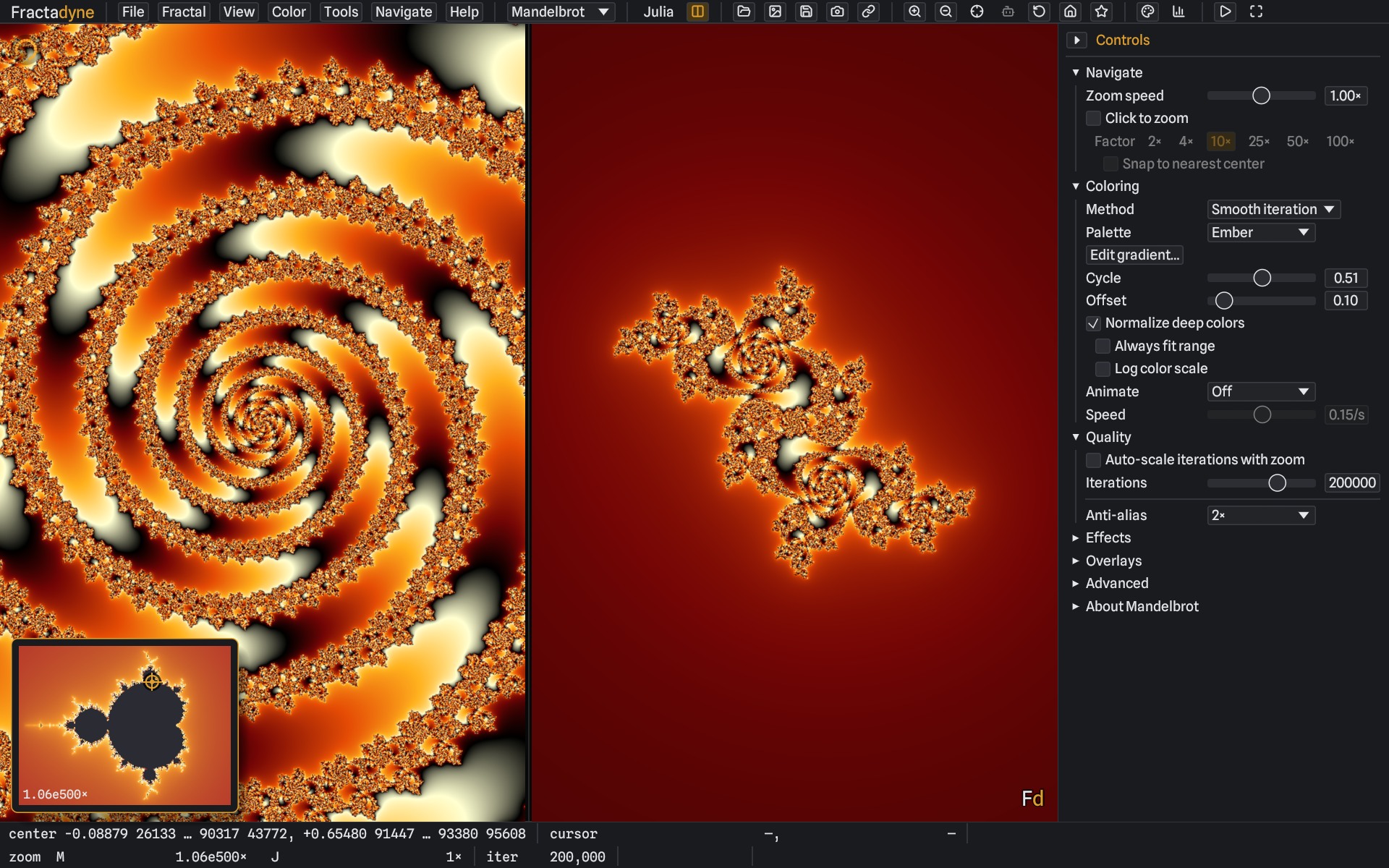
Fractadyne renders the Mandelbrot set and its relatives on the GPU, and keeps rendering them
correctly far past the point where ordinary floating point falls apart.
Zoom deep enough into a fractal and the arithmetic runs out of precision long before the detail
does. Fractadyne carries the centre of the view in arbitrary precision, computes one exact
reference orbit on the CPU, and expresses every pixel as a small deviation from it — switching
number formats automatically as the view deepens. So the depth you can reach is set mostly by
patience and by how much work the GPU will take, rather than by the arithmetic giving out.
It is free, open source, and a single self-contained executable: no installer, no runtime, no
account.
This is a work in progress. Fractadyne is under active development and has not
had a wide release. It is written and tested mostly on one machine, so other GPUs and drivers
are the least-proven part of it, and deep views in particular are still being worked on. There
is a list of the current rough edges further down — please read it before
deciding whether it is worth your time, and if something breaks, a report genuinely helps.
Unzip and run fractadyne.exe — 64-bit Windows 10 or 11, and a GPU with Vulkan,
DirectX 12 or OpenGL. Nothing is installed; delete the folder to remove it.
⚠Which build. The current build is v0.3.0-beta.19, a beta. The
0.3.0 betas continue the v0.2.41 series under a new version number. The
first button opens its release page, where the Windows zip, the Linux tarballs and the
accelerated variants all live; the few betas before it stay listed on the releases page. The old
stable v0.2.40 has been withdrawn so that nobody lands on a build a month behind.
Expect the Linux binaries to be less tested than the Windows build, because they are.
The releases page also carries downloads ending -accelerated — a .zip
for Windows and, from v0.2.41-beta.20, a .tar.gz for Linux. They are
optional and explained further down.
What it does
- Deep zoom, checked against another renderer. Twenty reference locations are
rendered against Fraktaler-3 and match its raw iteration
counts out to roughly 101105× magnification, with self-consistency checks
deeper still. Those are offline renders; see the limits below for what the live view does at
extreme depth.
- Interactive deep dives. Reference orbits are built ahead of where a dive is
going and scored across every CPU core, and the playback clock slows itself when the pipeline
falls behind.
- It measures its own cost. Each frame is timed on the GPU and the next one
is sized to fit that measurement, so a view too expensive to draw in one pass is drawn in
pieces instead of as one long submission. This is the part most actively worked on, and the
part most likely to behave differently on hardware I have not tested.
- Twenty-five built-in formulas — Mandelbrot, Multibrot 3 to 8, Tricorn,
Burning Ship, Celtic and Buffalo at powers 2 to 5, Phoenix and Newton — all but Newton with
Julia mode and a dual linked view.
- Your own formulas in Fractint-style expressions, typed as text or edited
typeset, deep-zooming like the built-in ones (more slowly); 53 come with the app, and Fractint
.frm files import.
- Beyond escape-time: Conway's Game of Life and its relatives on an unbounded
plane, and L-systems — curves and plants drawn from a rewriting grammar, whose detail
follows the zoom without limit.
- Colouring built for depth — six methods, editable gradients, and an
optional normalisation that helps keep deep images readable rather than banded.
- More than one graphics device. A second device helps the live view —
on a machine with one card, a second device on that card — and a still image or a tour can
be split across every graphics card in the machine, or a tour across several machines.
- Guided tours. Scripted camera paths with per-keyframe budgets: play them in
the app, or render them headless to an image sequence or MP4.
- Exports — high-resolution PNG or 32-bit linear OpenEXR, with the view
embedded in the file so any exported image reloads exactly where it was taken.
The -accelerated download
It is the same program as the standard build, with one difference: it
computes deep-zoom reference orbits using the MPFR and GMP libraries instead of the
pure-Rust arithmetic the standard build uses. That step is the CPU pause before a deep view
starts resolving, and it runs roughly 2.5× to 6.4× faster there,
more so the deeper you go.
It is not a general speed-up. It does not raise the frame rate, and it does not change the
picture — the two builds produce byte-identical images. That is checked rather
than assumed: the same reference orbits across every formula, at arithmetic widths from 64 bits
to 132,000, plus the whole 39-location comparison corpus. A difference between them would be a
bug worth reporting.
- Your settings, session and saved locations live in your user profile, not beside the
executable, so the two builds share them — switch freely, nothing needs
importing.
- On Windows, keep the
.dll files next to fractadyne.exe; it will
not start without them.
- To see which one you are running: Help → About, the “Deep-zoom arithmetic” line.
Why it is a separate download, rather than simply being the build: MPFR cannot
be built with the Microsoft compiler the standard Windows binary uses, so it comes from a
different toolchain; and MPFR and GMP are licensed under the GNU LGPL v3, while Fractadyne
itself is MIT OR Apache-2.0. Keeping them in a separate, clearly labelled download leaves the
standard build free of those terms. The full notices and licence texts are inside the zip.
If you do not need it, take the plain download. The app will offer you this one later under
Help → Faster deep zoom, linked to the version and platform you are running. The Linux
accelerated tarball (beta track, from v0.2.41-beta.20) uses the system's GMP and
MPFR rather than bundling them, and needs GMP 6.3 and glibc 2.39 or newer — Ubuntu 24.04 or
equivalent — where the standard Linux build runs on 22.04.
Latest updates
v0.3.0-beta.19 — credits for L-systems and the Game of Life
Help → Acknowledgments now credits the work the L-system and Life views build on: Aristid
Lindenmayer, The Algorithmic Beauty of Plants (Prusinkiewicz and Lindenmayer), Paul
Bourke's L-system collection, John Horton Conway, and LifeWiki, whose rule notations, pattern
format and pattern records the Life view follows. Rendering is unchanged from beta.18.
v0.3.0-beta.18 — a second graphics device for the live view, and rendering on several cards and machines
The live view now has a second graphics device working beside the one that draws the window.
On a machine with one card it is a second device on that same card (Advanced →
Second graphics card → Same card, the default; Off turns it off). It
renders whole frames of a moving view without waiting for the screen, and some of the 24
slightly shifted renders a still deep view averages to remove speckle. In a deep zoom test the
picture on screen used to trail the zoom by about 1.2× in magnification, and now trails
it by 1.02–1.04×, on an RTX 3080, an RTX 3070 and a Radeon RX 6800 XT. A
9.3×1078× view finished sharpening in 11.8 seconds instead of 20.3
on the RTX 3080, with no frame over 33 ms; in 14.3 instead of 41.7 on the RTX 3070; and in
10.9 instead of 64.8 on the RX 6800 XT, where the slowest frame each second while it sharpens
went from about 20 ms to about 34. The second device copies a deep view's reference only
when it fits a quarter of the card's memory. A failure that resets the graphics card ends the
app, so if the app ends unexpectedly while the second device is in use, the next start asks
whether to turn it off.
On a machine with two graphics cards, the same setting can give that work to the other card
instead, and Export image and Render tour have Use all graphics cards: on a test
machine with an RX 6800 XT and an RTX 3070, the two rendered the GPU part of a 4K export 1.7 to
1.9 times faster than either alone. A tour can also be rendered on several machines at once, as
a render farm: --farm-render on one, --render-client on the others, or
Tools → Render on farm… and File → Render client… in
the app. The machines talk over an encrypted, authenticated channel, and every frame that
comes back is checked before it is kept.
Separately, the averaging that sharpens a still deep view now starts once, after the
automatic iteration count has settled, instead of starting over each time it rose: at one
user's 2.3×10¹¹× view it finished after 85 seconds instead of
122.
v0.3.0-beta.17 — imported locations keep their iteration count
A Kalles Fraktaler .kfr location's iteration count was cut to 50,000 on import,
and an Imagina location's to 1,000,000, so a deep location asking for more was rendered with
too few: one at 10148× asking for 800,000 came out almost entirely black.
Both now keep the count they ask for, up to the app's limit of 10,000,000.
v0.3.0-beta.16 — your own formulas, fifteen more families, the Game of Life and L-systems
Fractal → Custom formula… takes a formula's step in Fractint-style
expressions — z = z^3 - p1*z + c, several statements, parameters —
with a syntax check as you type, and a Textbook view that shows the formula typeset and edits
it in place. Every formula deep-zooms with the same arithmetic as the built-in families,
though more slowly, except one whose power varies with z or c.
53 formulas come with the app, a library keeps your own, and Fractint .frm files
import: 88.6% of the distinct formulas in the Orgform collection read. Fifteen more families
are built in — Multibrot 6, 7 and 8, and Burning Ship, Tricorn, Celtic and Buffalo at
powers 3, 4 and 5 — each deep-zooming as its power-2 sibling does, and the folded
families now take the bilinear approximation: inside Burning Ship's main body at
1030× with 30,000 iterations the GPU's share of a render fell from
5.1 seconds to 4 ms.
Two families that are not escape-time fractals arrive too. Fractal → Automata
runs Conway's Game of Life and its relatives on the graphics card: 22 rules in B/S notation
are built in, and Generations, von Neumann, Hensel and MAP rules read too; patterns open from
RLE and other common files, and
cells are drawn and erased on screen. Fractal → L-systems draws curves,
space-filling curves and plants from a rewriting grammar — 40 are built in, from the
Koch snowflake and the dragon curves to the plants of The Algorithmic Beauty of
Plants, and Fractint .l files open directly. Their detail follows the zoom
without limit: the Koch snowflake's corner at 10100× is as sharp as at
1×. An L-system exports as an image or an SVG drawing and can be the subject of a tour,
drawing itself on or changing its angle as it plays.
v0.3.0-beta.9 — shallow zooms keep their detail while they move
Past about 104×, where the direct mode ends, a moving view used to show its
last complete picture stretched to follow the zoom — about 1.5× on average —
while the next one was rebuilt over a dozen frames or more, even when the graphics card could
draw the whole frame in a few milliseconds. Now a frame measured as cheap is drawn fresh and
shown at once. A dearer one, up to 36 ms of GPU work, is drawn in up to eight pieces, one
per displayed frame, each a checkerboard of small squares spread over the whole picture, while
the previous picture follows the zoom until the last piece lands. On the development card (an
RTX 3080 at 120 Hz, a 1280×800 window) the picture during a zoom from
106× to 1012× is now stretched about 1.08× instead of
1.54–1.60×, at 120 frames a second, and from 1012× to
1018× about 1.2× instead of 1.65×. Deeper than that the view
behaves as before.
The automatic iteration count also stops climbing on views that do not need it: at the
whole-set view it could run ten times higher than necessary for the rest of the session. On
the Radeon RX 6800 XT at a 1280×800 window the new drawing cannot make a piece cheaper
than the whole frame, so it stays out of the way there, and that fix is what shows: a zoom
from 104× to 4×10⁹× at 60 Hz now shows its
picture stretched about 1.5× instead of 2.2–3.2×.
Full history in the
changelog.
The app can check for updates itself (Help → Check for updates); with no stable release
on the page at the moment, the beta track is the one that finds anything.
Where it is rough
Named here rather than discovered later. None of these are secret — they are the things being
worked on, in roughly the order they are likely to affect you.
- Deep views are slow, and degrade while you move. During a zoom the picture
is coarser than the still image you get once it settles, and at extreme depth settling can
take a while.
- Extreme depth is slow the first time. The deeper the view, the longer the
reference orbit takes to build before anything resolves — minutes around
104000×, and about six and a half hours at the deepest location we track,
1060205×. From v0.2.41-beta.78 that orbit is kept on disk, so a second
visit to the same place, or anywhere near it, takes seconds. Some locations still need more
reference samples than the live view holds; the app says so in the status bar rather than
showing an unexplained black screen, and an offline render can sometimes resolve what the
live view will not.
- Glitch correction on exports can be very slow when you ask for a very high
iteration count at extreme depth — minutes, not seconds. From v0.2.41-beta.140 it no longer runs
for Mandelbrot and Multibrot exports, where it was found to repair nothing; the other formulas
and Julia views keep it until the same check has been done for them.
- Rendering a long tour offline has no memory or per-frame cost bound. Give
it a big frame size and a deep path and it can grow until the machine complains.
- A very large or very deep export can still lose the graphics device.
Splitting the work into watchdog-sized pieces removed the clearest cause, and a full-quality
export of a deep view now survives where it used to fail early — but a multi-hour export
at the extreme end can still drop the device late in the render on some drivers. It is the most
actively worked-on problem; the crash report it writes is exactly what helps.
- Zooming can lose the graphics device on at least one AMD card. On the Radeon
RX 6800 XT used for testing, a live zoom at a modest depth has reset the graphics driver more
than once. From v0.2.41-beta.131 a safety stop catches the runaway frame behind it, and in a test
that recreates those conditions the app now survives where earlier builds hung the machine
— but the underlying cause is not fully understood, so treat it as mitigated, not fixed.
If it happens, the app leaves a record of its last few thousand frames behind, which is exactly
what a report needs.
- A very high iteration setting can make the window unresponsive. Millions of
base iterations on a large window at depth can give the GPU more work per frame than it
finishes in time, and the app then answers input only about once a second. It notices this
happening but does not yet back out on its own — if you hit it, lower
Iterations (base). Closing the app is not enough: the setting is saved with your
session and comes back the next time you start it.
- Hardware coverage is thin. Development happens on one NVIDIA card. An AMD
card now runs the validation suite on every release, and still differs from the development
card in places — one of its self-test checks fails there and nowhere else, and on it the
cheaper deep arithmetic of beta.141 changes up to 8% of pixels at some locations (0.14% at most
on the NVIDIA card), all in chaotic fine detail where a check against exact arithmetic favours
neither version. Help →
Diagnostics runs that self-test on your machine so a report can carry evidence.
- The Linux build is young. Linux binaries ship with every release, but
Windows is the platform that gets tested, so treat Linux as early.
- The newest parts have gaps. A custom formula iterates every step at depth,
so a deep view of one is several times slower than a built-in family's, and where
log, sqrt or a fractional power jumps across the negative real axis a
deep view can show noise along it. A Life view cannot be exported as an image yet.
- The second graphics device is new. It is on by default from
v0.3.0-beta.18, and has been tested on three cards from two makers. If the app ends
unexpectedly while it is in use, the next start offers to turn it off, and Advanced →
Second graphics card → Off does the same at any time. The render farm
has been run between two machines on one network.
- Not present: layer compositing, 3D. Export size is capped by what the GPU
can allocate at once.
At a glance
| Platform | Windows 10/11 64-bit; Linux x64 |
| Graphics | Vulkan, DirectX 12 or OpenGL, via wgpu |
| Written in | Rust, with egui for the interface |
| Licence | MIT or Apache-2.0, at your option |
| Price | Free, and free of tracking, ads and accounts |
Getting in touch
Bug reports and feature requests are best filed as
GitHub issues — they are public
and searchable, so other people can confirm and follow them. The app can open a prefilled report
for you from Help → Report an issue, including the version and hardware details.
If you would rather not use GitHub, write to
feedback@fractadyne.org.